 Ian Anderson Gray

Do you want to make your Facebook Account private?
Do you want to lock down your Facebook account away from prying eyes and make it more secure?
In this article, I show you how.
People have asked me many times how to lock down their Facebook account.
Why?
Not everyone wants to be on Facebook. But sometimes you don't have a choice. Perhaps you want to be involved in certain Facebook groups or keep tabs on what family members or friends are up to.
Since the early days, Facebook has come a long way regarding privacy and security. They do give us so much control over our data and privacy. Some might say they give too much power - because it is far too complicated for most people to figure out.
So, that’s how I came to write this article. It is written for people who don’t want to be on Facebook, but...
- Manage a Facebook page or group
- Be involved with a group or community on Facebook
- Follow the posts of certain friends or family members
It’s also for people who are just paranoid about Facebook but still want to use it.
Not all groups are private, so you'll always need to be careful what you post on Facebook. Broadcasting to Facebook Live and public posts should be avoided.
As for me, I enjoy Facebook, but I understand the concerns. I’ve not locked down my Facebook account anywhere near as much as what I am suggesting in this article. However, I want to make it easy for you if you do.
If you want to secure your Facebook account and make it as secure as possible... if you want to use Facebook but stop being found, this article is for you.
How to Make your Facebook Account Private
STEP 1: If you don’t have a Facebook account...
(If you already have a Facebook account, skip on to step 2)
If you don't have a Facebook account, you'll need to create one. Here is how you create a Facebook account and make it private.
- Go to Facebook. Sign up for an account. If at all possible, use a private email address that you don’t use elsewhere. We’ll make sure Facebook doesn’t allow people to find you via your email address. But it’s best to be on the safe side. If you use GMail, you can add a "+" symbol followed by a word (before the "@" symbol). This, in effect, gives you lots of different email addresses for the same account. For example, [email protected] will receive the same emails as [email protected] or [email protected].
You do need to enter your proper name, as creating a fake account goes against Facebook’s terms - I can’t recommend this since it goes against Facebook’s terms, but if you select the oldest possible date for your birthday, Facebook won’t be able to target you so much with specific ads.
- Confirm your email address by entering the code that was emailed to you:

- Once you confirm your email address, you can move on. Click OK...

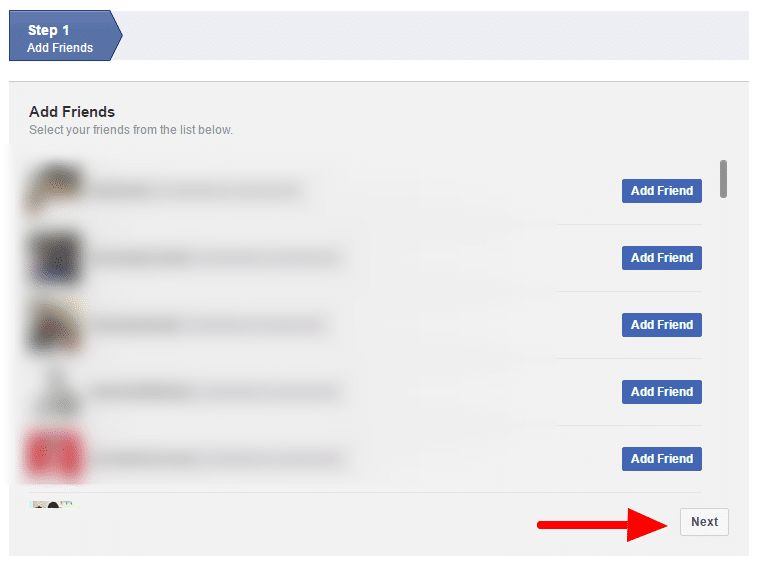
- Facebook will ask you if you want to add some friends. Just ignore and click "next":

STEP 2: If you already have a Facebook Account, you can start here…
Make sure you've logged into your Facebook account. Now, it's time to make your Facebook account private and secure.
Not adding your photo as your profile picture will help you be less recognisable. You could either leave it blank or upload a generic image.
Click on your profile picture in the top right corner of your Facebook page. Then click 'Settings & privacy' and then 'Privacy Checkup'. This will open the Privacy Checkup options.
You will now go through the simple steps to make your Facebook account private.
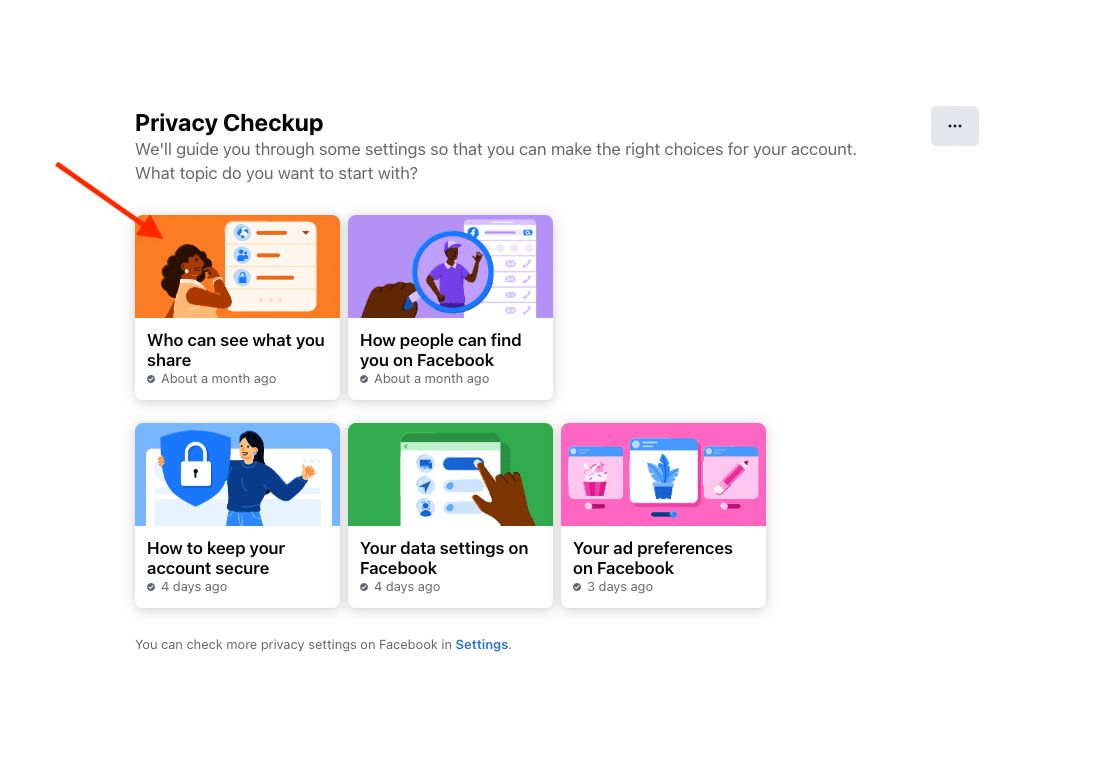
First, start by clicking 'Who can see what you share' box.
You will start first with setting the privacy for your profile information. If you do not want certain profile information available to anyone, make sure to select "Only me" for those options.

Once your profile privacy is set the way you want it, click NEXT
Now you will set privacy for your posts and stories.

Future Posts – You can make all future posts available to the public, to friends, Friends except, Specific friends only, only to you or customize who can see your future posts.
Stories – Because posting to stories is optional, the options are more limited. The possibilities for stories are public, Friends, custom and hide stories from, which will hide certain people from seeing your stories. You can also choose to turn commenting off on your stories.
Limit Past Posts – You can change who can see past posts you created. This will limit all past posts to "only friends".
Once you have updated your post and story settings the way you like them, click NEXT.
Here, you can block people, if needed.
Click Add to blocked list
Type the name of the person you want to block. Find the person and click "Block" to the right of their name and profile picture.
Click NEXT then click Review Another Topic.
Now click on How people can find you on Facebook
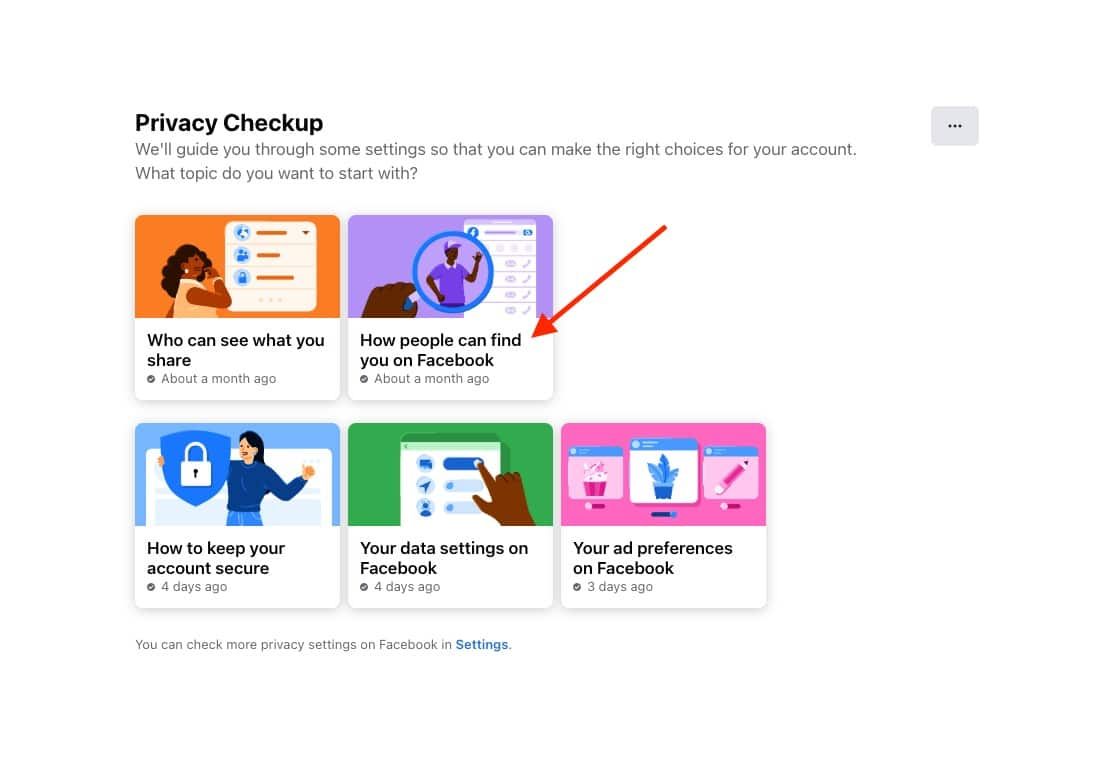
Click Continue

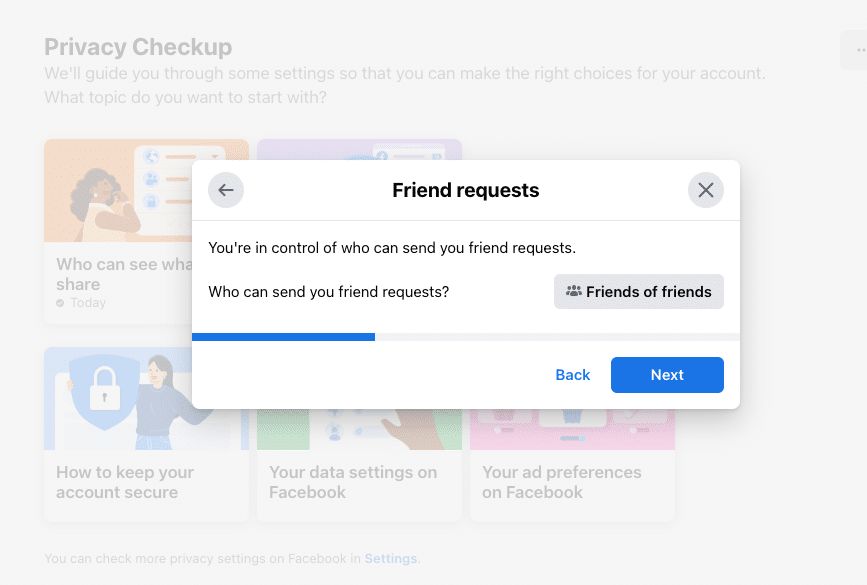
First you will decide who can send you friend requests. The options are everyone or friends of friends. To limit your privacy, you will want to select friends of friends.
Click NEXT
Now you will decide who can look you up, or search for you, by your phone number and email address. For the maximum privacy on FB, select Only me for both phone number and email address.
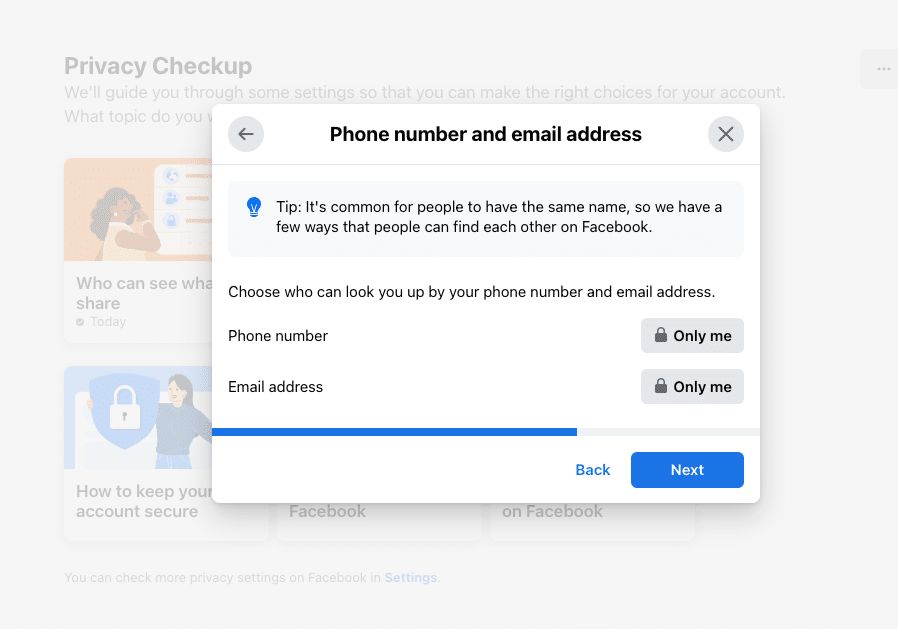
Click NEXT
On this screen you will have an option to allow search engines, such as Google, to link to your profile to help people find you.
The default for this option is OFF. For maximum privacy, keep this selection.

Click NEXT.
You have now completed the 'How people can find you on Facebook section'.
Let's move on to the next section, 'How to keep your account secure'.
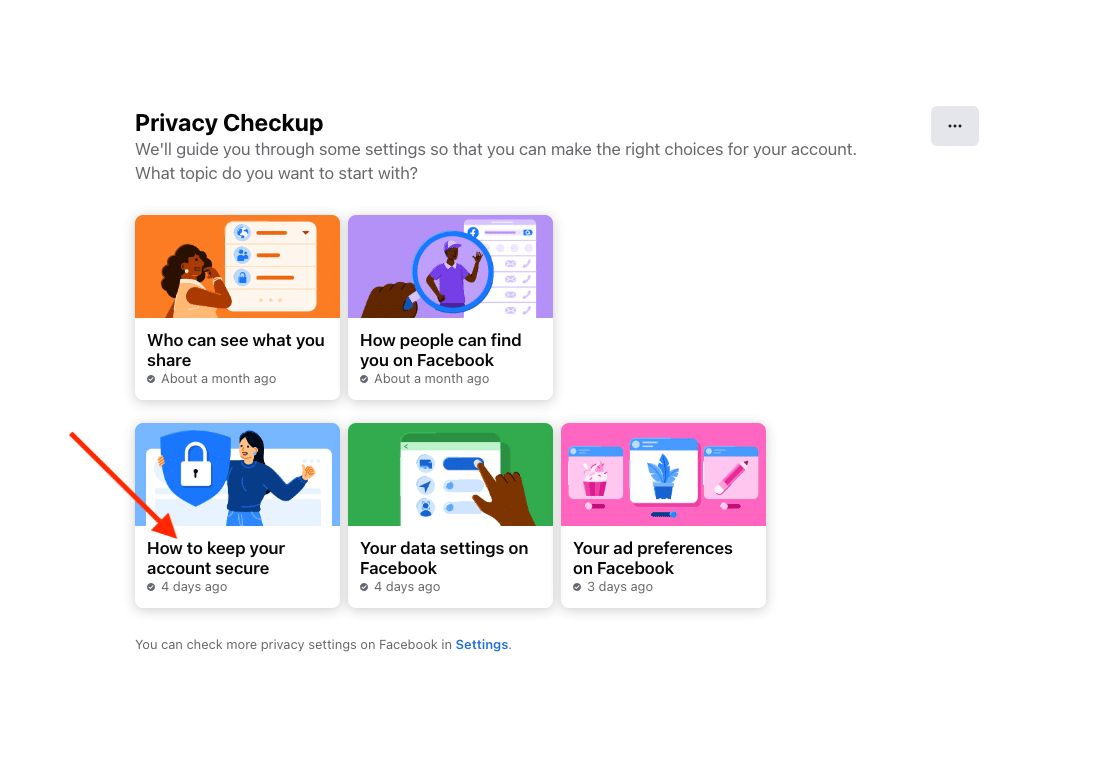
IMPORTANT!!!
Password privacy is extremely important. Your password should be secure and not be used for any other websites. If this is not the case, you will want to change your password to a secure password.
In order to manage original, secure passwords for every website you log in to, I recommend using a password manager program such as LastPass. LastPass will not only store all your passwords but it can also be used to generate secure passwords and can automatically log you into websites that you visit. One of the most incredible things, aside from having a security system in place for all of your passwords, is that you no longer need to memorise your passwords. You just remember your pass phrase for logging into LastPass, and then you have secure access to all of your secure passwords inside your vault. LastPass has a lot of other features as well that you can check out here on their website.
If you need to change your Facebook Password, keep reading here. If not, you can jump to the next section.
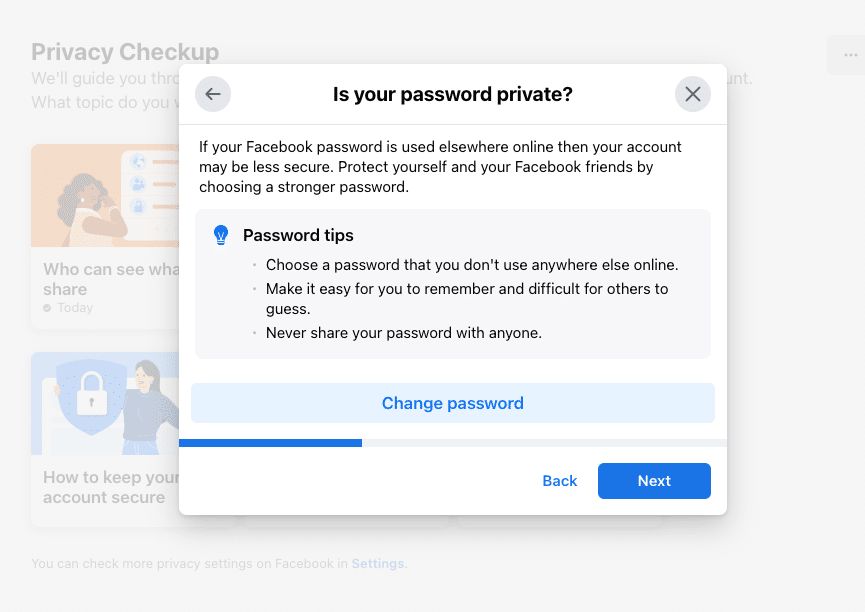
First click Change password.
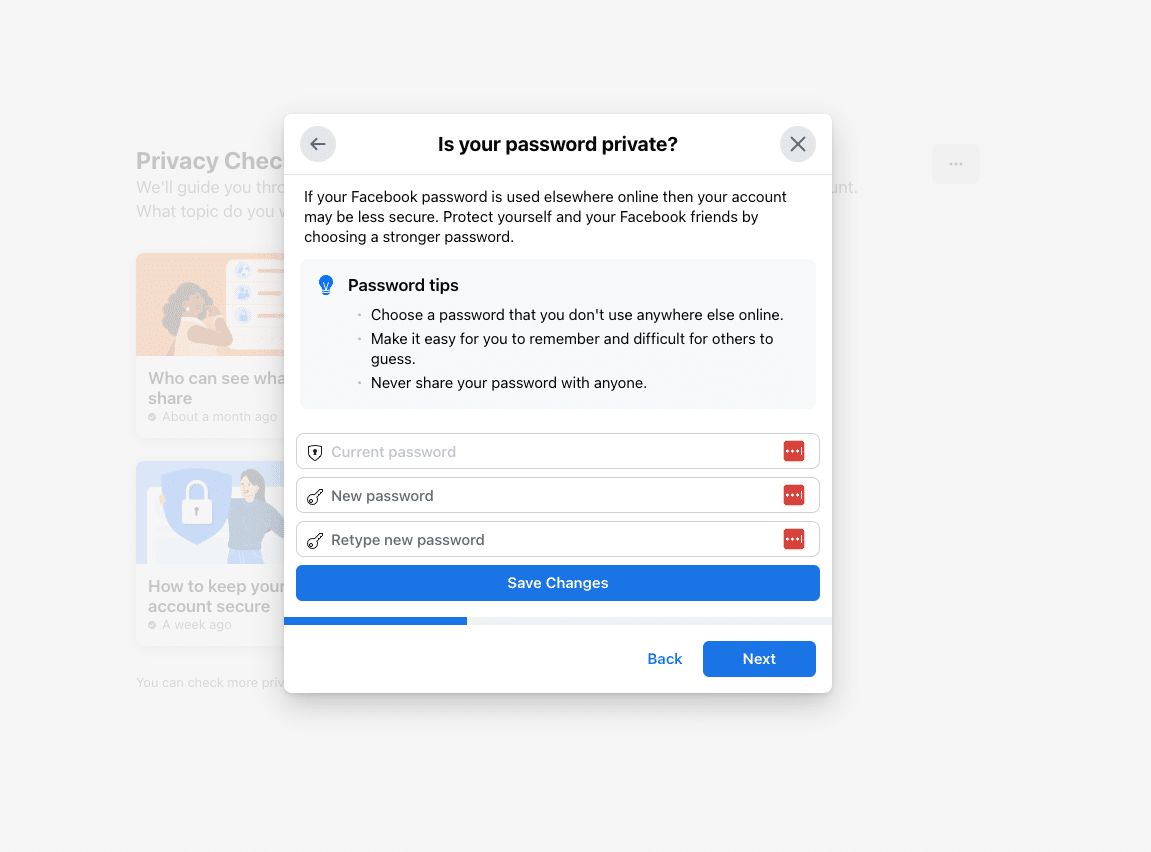
In the first field, enter your current password.
In the second and third fields, enter your new secure password.
Click SAVE CHANGES.
If you did NOT need to change your password, click NEXT
You will now have the option to turn on two-factor authentication (2FA). For maximum protection of your Facebook account, I highly recommend you use 2FA. If a hacker manages to steal your password, they won't be able to log into your account unless they also have your two-factor authentication code, which changes every 30 seconds.
To turn on 2FA, click Get Started. Otherwise, click NEXT if you do NOT want to turn on 2FA.

Turning on two-factor authentication (2FA)
Using an Authenticator App
I highly recommend that you use an Authenticator App for 2FA. I like the Google Authenticator App as it is easy to add 2FA and easy to use.
Get the Google Authenticator app for Apple iOS here
Get the Google Authenticator app for Android here
If you have never used an authenticator app before and have questions, this article can help get you started.
To turn on 2FA using an app, click on the Use Authentication App button. Then open your authenticator app and scan the QR codeA square barcode that a phone camera can scan to open a web address. code. Alternatively, you can copy and paste the code provided into your app.
Click continue and then enter the code from your app for your FB account.
Once you enter the code, you will receive a message that 2FA has been activated. You will then be prompted to login again.
When you login again you will be offered the ability to add a back-up method for 2FA.
I recommend that you do this, and using either Text Message SMS or Recovery Codes would be solid options for securing access to your Facebook account.
Using Text Message (SMS)
Another option that FB offers is to have a code sent via text message to your mobile phone every time you log into Facebook.
Click the 'Use Text Message (SMS)' button and enter your phone number and click continue.
You will receive a code via text message.
Enter that code to in the space provided.
Using a Security Key
If you have a physical USBThe common cable and socket for connecting cameras, microphones and other devices to a computer. security key, you can use this for 2FA for your Facebook account.
You can click here to learn more about physical USB security keys.
Alerts
Finally, you can turn on Alerts so that you are notified if someone logs into your Facebook account from an unrecognized location.
I recommend that you turn on both available options, receiving a Facebook notification and receiving an email.

Click NEXT then click Review Another Topic.
Now click on Your data settings on Facebook and click CONTINUE.
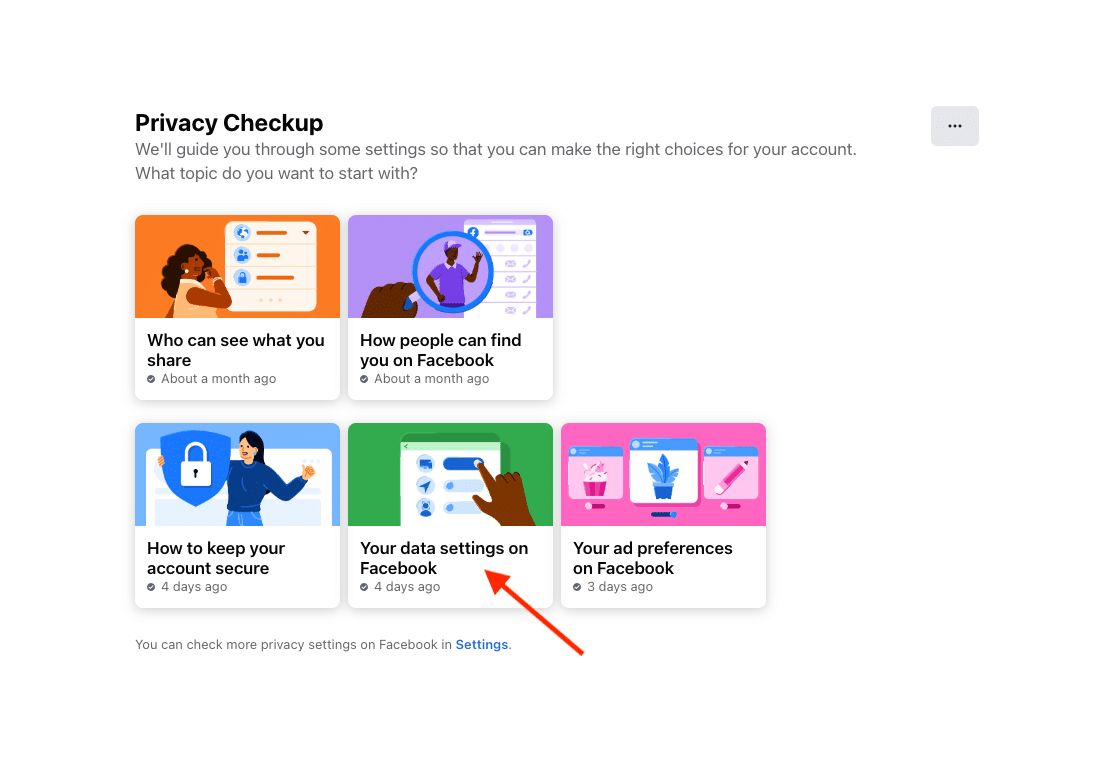
You will now review the apps and websites that you have previously used to log into Facebook. Remove any that you no longer want to use.

Click NEXT then click Review Another Topic.
Now click on Your ad preferences on Facebook and click CONTINUE.
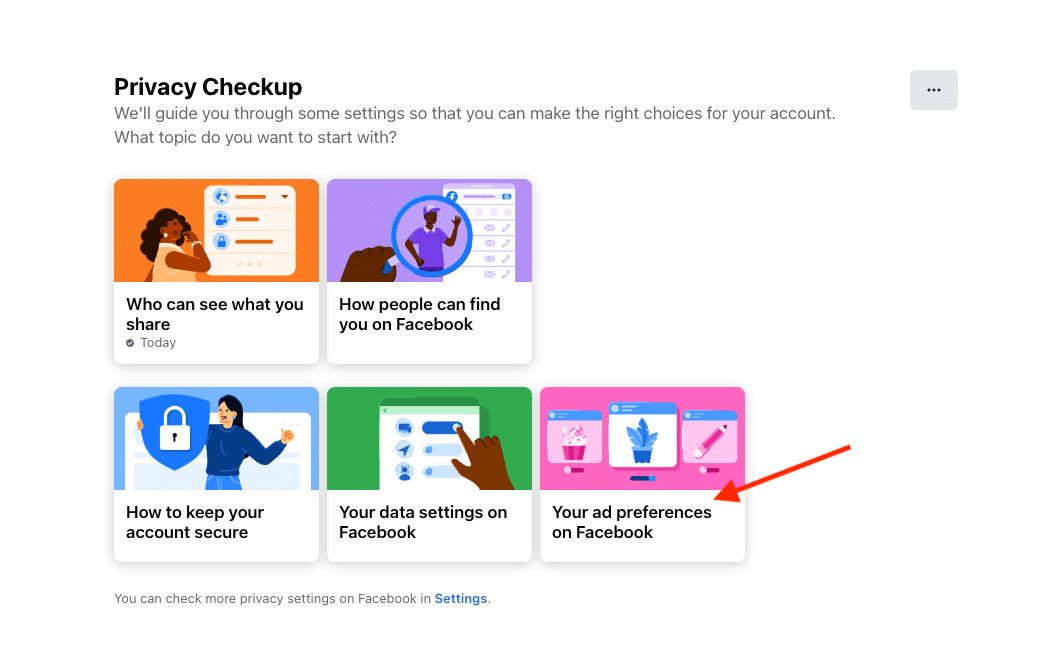
I encourage you to read this page, as it explains how Facebook personalizes ads based on what they think interests you.
Once you have read through this page, click NEXT.
Here, you can change how advertisers target you based on your profile. Turn off any settings you do not want to be used to target you for advertising.

When you have your settings the way you want them, click NEXT.
On this page, you decide if your friends can see social interactions you have had with pages. If you want to keep this private, then scroll down and change the setting for 'Who can see your social interactions alongside ads?' to ONLY ME.
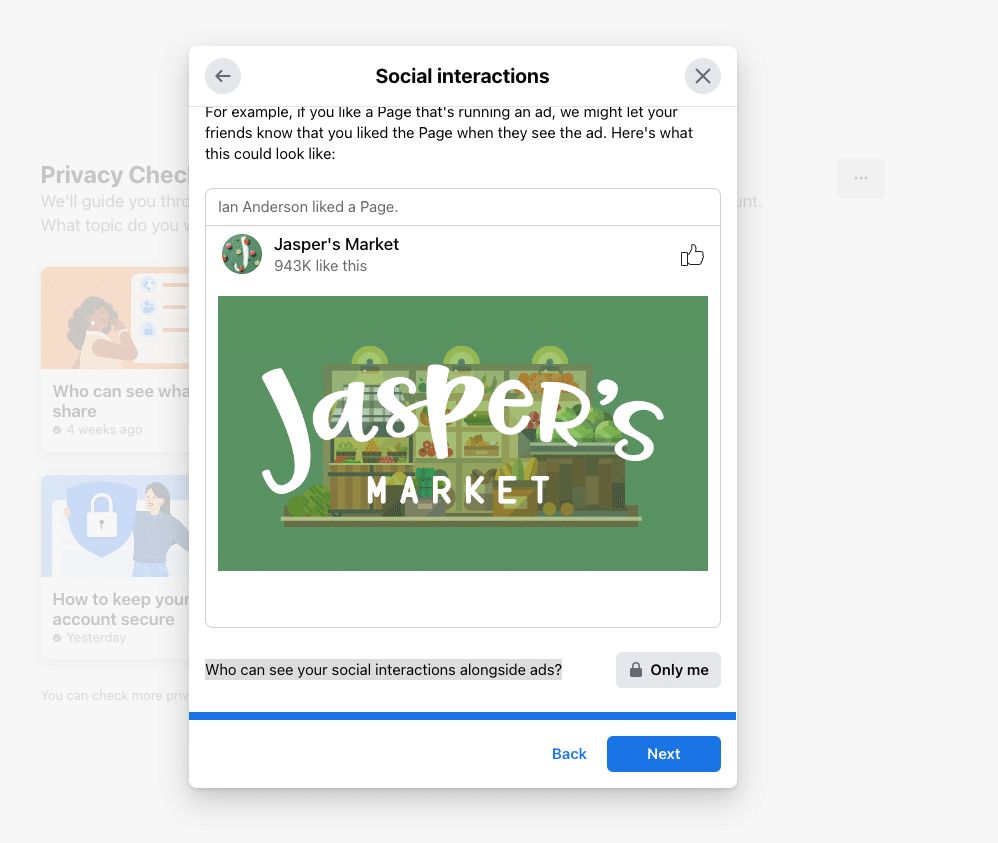
Click NEXT.
That’s it! Your Facebook account is now PRIVATE and SECURE.
You’re pretty much done at this point. However, it is worth saying that you’ll never be able to be utterly private on Facebook. That’s not what a social network or the internet was built for.
However, if you follow the points in this article, are careful what you post, and don’t give Facebook too much information, you’ll have locked things down as much as you can!
I also recommend unplugging and having a social media blackout a few times a year. You'll feel better for it.
I hope this article has helped make your Facebook account private and more secure. Let me know in the comments below.
Thanks for this Ian, this is quite useful thing to know! I've shared it with my followers!
That's great to hear, Anja, glad you found it useful!
Hi
How to make Facebook group privacy more public than private ???
Very Informative.. definitely sharing to my circle.. have a question.can we deactivate our account for some limited time - suppose for 2/3 months, then reactivate it?
Thank you! I am glad this was helpful for you.
Yes, you can either delete or deactivate your account. You can find more information here: https://www.facebook.com/help/250563911970368/?helpref=hc_global_nav
Facebook has a pretty comprehensive help centre where you can get help, as well.
Ian, is there any way to restore the account once deleted, not deactivated but deleted?
Hi Matthew, I am pretty sure it's not possible. Once they are deleted they
It is very good information.
Hi Ian, great article!
I worked in digital marketing for two years, specializing in social media, so I guess I know my stuff! I love the detail you went into here; you really covered everything! There are a heck of a lot of blogs out there telling people how to jazz up their profile and get involved, but not nearly so many for people who want to sign up but not get directly/publicly involved. You've filled an important gap in the market!
I do have a question, though. Do you have any problem (morally, I suppose!) with Facebook's advertising methods? You mention here that you don't really mind them, but personally I'm a little uneasy about how they gather users' personal information and effectively sell it to advertisers without explicitly telling users that's what they're doing. Do you have any views on this?
Again, great article. You've got yourself a new regular reader!
Joe
The Importance of Social Media Marketing for Sales and ROI
1. Social media marketing will get you more sales. Did you know that 70% of business-to-consumer marketers have acquired customers through Facebook? Or that 84% of CEOs and VPs say they use social media to help make purchasing decisions?
Not surprisingly, when you stay in front of your customer base, they’re more likely to buy from you when they need the products you sell. Social media marketing doesn’t just keep your company’s name in front of potential buyers, but it also gives you the opportunity to constantly give them incentives to buy. Try sharing coupon codes, with a unique code for each social channel – you may be surprised at which social network drives the most sales.
2. You’ll find customers you didn’t know existed. If you set up streams to follow keywords in Twitter (Hootsuite makes this simple), you can find people who are looking for the products you sell and direct them to your site. Using Twitter for marketing is great that way – telling people who want your products how to get them from your company is just an @ away.
3. Customers you didn’t know existed will find (and buy from) you. In the process of marketing with Facebook, you’ll probably join a ton of groups related to your products, industry and customer base. By posting links in these groups, you’ll help influence customers to check out your site. Answering questions on Quora is another option. Post a link today, and two weeks/months/years later you might see a sale from it.
4. You heard that right — it’s free. How can you argue with that? If you handle your own social media management, running a social networking campaign is as cheap as it gets. If you hire a social media management or online PR agency (like us), it will cost around $3,000-$7,000 per month, but it’ll be an investment that you’ll be likely to see a return on. If you’re intimidated by interacting with people online or your writing skills leave something to be desired, hiring an online PR agency is definitely the way to go. Posting poorly written content or conveying the wrong kind of messages on social networking sites can seriously affect your digital PR presence.
5. The ROI on social media ads is unbeatable. The average cost per click on Google Adwords is between $1 and $2 and depending on the keyword targeted, you can end up paying $50 or more for a single click. Through targeted boosted post, we’ve been able to send traffic via Facebook and Pinterest for as little as $0.12 per click. Why pay ten or twenty times as much for each visit when social media ads make earning that traffic quick and easy?
Simply put, social media marketing is part of doing business in the new millennium. If your business isn’t already active on social networking sites, now is the time to start.
Thanks, Jame, you make the case for a business to be on social very clearly. I totally agree with you. I do think, however, there is a difference between a business being on social, and an individual. Some people are just not comfortable with using social media personally. I hope this article will allow them to use social media as a business while continuing to choose not to use it for personal use.
As for me, I use it for both, but I do know a few people who would rather not!
thanks!
Facebook Is Really An Important Social Media Platform These Days. We Are Using This Social Media Platform On Daily Basis As It Is Becoming More An Addiction To User's. But These Days Instagram Is Getting More In Minds Of User's. People Are Buying Instagram Followers. Trying To Get On Top Of Their Competitors.
Today facebook is a great social media platform to increase your popularity and also increase your product sell because these days 99% user daily using it. and also facebook is very easy communication palace and connect with friends and family, every user easily can advertise your product, but now days instagram is another great social media platform to getting famous and popular with buy Hug number of followers on instagram profile....
thank you
Thank you!
Hello Ian, this is a very good article. I would like to present another solution. Sidenet.com is a social website for meeting new people, not for dating. It is specifically focused on data privacy - does not collect any secret data, does not reveal activities to other users, no targeted ads, no tracking.
Hi Jason, thanks for letting me know. Are you connected with sidenet?
That's great for people who are wanting an alternative to Facebook. Of course, there are some people who just have to use Facebook (although they would prefer not to) to keep in touch with friends/family or join a community that already exists. That's what this article was meant to
Thank you. Full disclosure: I have contributed much to its creation, so I am biased. Facebook will definitely be around for a long time, but it uses drastic information handling techniques - it has become not safe to touch anything. Facebook has also become a mass-market tool - everyone wants to spread ideas or sell something.
Thanks, Jason, I appreciate your words. I think knowledge is power. I've looked into how Facebook uses our data a lot, and I am ok with it. But many people haven't looked into it and don't understand. They'll either be fine with it or shocked. It's really important for there to be alternatives and so it's great you've helped to create one of those places.
Hi Ian, thank you so much for this article - it was exactly what I needed! I refused to use Facebook until now (lots of reasons) but finally gave in and signed up yesterday because I am doing an online course and wanted to join the private Facebook group of all the students. I followed all your steps and was happy with the result. But Facebook was not. ;-) It seems that protecting your privacy is a very suspicious activity and my account got blocked three hours after I signed up! I received the dreaded (I did not even know this existed!) "photo upload request" - let's see how that goes... not sure what photos they are going to use for comparison? Again, I did everything you mentioned in your article and after that I just uploaded a cover photo and followed two official Facebook pages (an author and a TV series). But it seems that is not considered normal by Facebook! I just wanted to let you know. :-)
Hi Meike,
Thanks so much for taking the time to let us know about this. In my research, I didn't come across this kind of issue. Was the "photo upload request" an email? What did it say? Facebook is trying to put privacy as a priority (at least make it look that way) but it's also battling with fake accounts, and it's probably this that is causing you issues. Let me know how you get on.
Hi Meike! Did Facebook eventually let you log back into your account?
Well, the moment Facebook instructed me to verify my account via phone number (or else not allowing me to use my new account), phone contacts immediately became suggested friends. So I started blocking certain people I do not want to see my profile. Facebook then locked my account after requesting my photo for verification. Ah, I thought I had beat the system haha!
Oh no! I'll need to look into that. They shouldn't be able to link contacts from your phone number. Did you change the setting to stop Facebook from looking up contacts? It's in the article above. Ian
Hello Ian ,
Thx for the info , I am only interested in selling my stuff : cars , RV, and smalls . Will these settings allow me to use Marketplace Effectively? Market place has devastated all other platforms of sales in my area with the possible exception of Ebay . (CL and Let go are a joke !)
Hi, Rick. Yes, you'll be able to use Marketplace. But in order to use it effectively, you'll want to fill out some of your profile properly - putting a photo for example. Ian
Thanks Ian,
That makes sense .... I always figured the reason Marketplace overtook CL is because users can see a profile on the person they are considering transacting with . AS for why CL can't improve on their formula after all these years.... beats me !
Could be many things. Apathy. Lack of resources. Who knows?! Glad I could
Hey Ian ? I’ve been trying to create a fb to create fb ads only without having to put any info about me personally... everytime I do fb ends up deactivating the account when they ask for photo verification what should I do?
Hi Tye. It's annoying that FB wants you to create a profile just to create ads. You will need to add some info about you - such as your name etc. And you will have to upload your photo verification. But you don't need to have any of this (except for your name) publicly viewable.
Hello
Try as I might I can't post in a group without it ending up on my page for all to see. I have clicked only me in privacy but it keeps showing. I intend to change it back to friends once I have had a response but it's driving me bonkers! Any help would be appreciated.
Hi Sue. So, is this a public/open group you are posting in? And it is appearing on your Facebook personal profile? If you could clarify that would be great and I'll do my best to help. Ian
I want to set my privacy so the no one but my friends can look at my profile. I d9nt want strangers to be able to see anything about me..like groups that I like or follow.
Hi Janette, it's not possible to totally lock down your Facebook profile, but you can get pretty close. Just follow all the steps in this tutorial.
Hope this works for you. Ian
Hello, thanks for the article. I would like to use the private groups and brows the marketplace but have my profile as inactive to friends and family. Is this possible or will I have to create a secondary secret account for this purpose?
Hi Jimmy. That's a bit tricky. You could lock down your account as much as possible so that it's just your name and photo. Also, if you use a different email address than what your friends and family know, then it's unlikely that they'll find you. You could create a secondary secret account, but bear in mind that this goes against Facebook's terms. Ian
Hi Ian. If I set up a Facebook account and do all the things you mentioned in your article, what happens when someone randomly does a search within Facebook for my name? Will they see that I have an account, even though they can't reach out to me?
I think they can search for you within Facebook. But if you lock down your account, they won't be able to see anything about you. Ian
Hello, is it possible to keep your personal page completely (or as much as possible) private but still manage a group page that is public?
Yes, it is, to a point. You'll still have people clicking through to your profile if you post in the public group. But if you go through as many steps in this article as possible, they won't be able to see much at all.
Hope that helps.
Hi, Ian Anderson Gray! A different Laura here, asking a related question. I am an administrator for a new Facebook page for my church here in Paris. (I am American, but I volunteer here.) Another person set it up who didn't understand how Facebook works, and she's asked me to take it over for her. So 48 hours ago I set up a page off the account she set up, and last night my pastor asked me to make the account private... but obviously we want the page to be public. I made the account as private as possible, but now when I search for the page online, it too is invisible!
So... how to make the account private, but the page public?
(The account had already attracted 50 friends, and I sent invitations to all those friends to like the Page, and 20% have done so so far. But I'm concerned that only those who were already friends can see the Page. When I search for it from a Facebook account in a different browser, it doesn't show up at all!)
Hi Laura! I am not sure how the account was set up. Was there a personal profile set up in order to create the page? I assume this personal profile is kind of a "fake" one - for a person that doesn't exist? Ideally the page should have 2 or 3 admins. So, I assume you are now admin, and this other profile is admin. Although reading again what you did, it sounds like you are logging into the other account that was created. That's not a good idea. Best to add yourself as adminAnd can you just delete the old admin profile? That way, the page doesn't have any link with that account.
Ideally, a few other leaders in the church should have admin access - just for safety.
I found this very helpful and user friendly. I am now a 105 year old woman with no friends, interests Or likes of any kind!! I needed to join to follow the Faceboook page my voluntary organisation has.
Thanks a lot!
How do I restrict all my photos in FB? I never created albums, so any category whether it be mobile uploads, I want to make them all private. Can this be done?
Hi Ian thanks for this article, but i have a little challenge i don't know why i am getting friend suggestions from people who are my friends already. And its really annoying is there a way i can stop that? :?: :?:
Hi Ian, I’m trying to set my see your about info to “only me” Can you please help?
Hi Angela, you have to set each section within your about section to only me. You can't set it all to "only me" in one go. Hope that helps! Ian
Hi, I've set up a Private Group on Facebook on behalf of my workplace, but as I set it up and am one of the administrators I've been informed that those who have joined the private group can now see my own personal profile and private Facebook page. Obviously I would like only to post/respond anonymously on behalf of management -help!
Hi Marie,
You can hide the list of admins and moderators in the group. But whenever you post, people will be able to see your name and link to your profile.
The way around this will be to add the workplace's page to the group and post as that. Hope that helps!
Suggest also adding two private email addresses which allows you to remove the cell phone number. Also, if you lock down the profile but facebook manages to find friends based on other info while setting up the account (had my phone number at first but removed it later), you can individually remove the friend suggestions from the list of Welcome page, Find Friends or suggested friends. I don't want the app to suggest any friends.
Thanks so much, Ash. Great tips! Ian
Hi guys long story short i need to open a new facebook account because i closed my old one to keep the peace my partner was forever asking me who i was talking to or she would say why are you talking to those arse holes you don't even know them that's because i joined the O'Brien clan and most of them live overseas and i would like to keep in touch with them also even though my partner and myself don't live together she comes up once every two weeks and stays for a few days so i would like to set up a facebook account were she cant see or access but i leave my laptop on all the time so if i am up the back yard more often than not when i come in she will be on my laptop looking to see what i have be up to so being a older person i am not that computer literate i don't know how to hide a facebook account or anything like that i hope somebody out there can help me cheers
Hi Michael, Unfortunately, you can't totally hide your Facebook account, but if you follow the steps in this article, you will be able to make it as private as possible. You don't need to add your photo or use your full name. And if you use a different email address. All those things will help. All the
Hi Ian, I have a rather unusual question. I have a FB account but I do not share it with my husband because he and our son do not speak and he does not want me to have contact with him. Therefore, I just avoid letting him know I even do much in FB. But.....someone told him about FB Marketplace and he loves to look at it, but cannot contact anyone regarding items he is interested in because he doesn't have a FB account himself. I want to set him up with a private one because if not private then he will see all my friends and my posts and know I have had some communication with our son. Strange, I know, but that is life when we choose not to forgive. Do you think that I can set him up with an account and trust that he will not receive friend requests? I really would like him to be able to connect with his old friends and our family too, but I just feel it is too risky at this time. Suggestions please!!!
Hi Karen, sorry for the delay. That's a tough one. If you follow all the steps in this article, you and your husband should be OK. But it's impossible to guarantee. Facebook has a powerful algorithm to suggest friends, and if you connect with each other, it could still recommend friends. Sorry, I can't help any more. Ian
Hey Ian I just seen this awesome piece of information, thank you so much for taking the time to explain all the steps. I have a question too. Let's say I have only one contact and then I want to add just one more. Will the two know of eachother through me? Will they meet because I am the common link? I've never had facebook so I don't know how it works. But I wouldn't want one to know about the other. One is my child and the other is a long lost highschool friend.
Hi AJ. That's a great question. In the FB privacy settings, you can set your friends list so that only you can see it. When you do that, not even your FB friends can see who else you are connected to or "friends" with. However, it’s impossible to guarantee. Facebook has a powerful algorithm to suggest friends, and if you connect with each other, it could still recommend friends. Hope that helps! Happy New Year!
Thanks much. Been a FB holdout for a long time. If I know I can keep a profile selective and private, I might sign up, still learning about FB features more before I do
Hi Juno. Glad this article was helpful for you! Happy New Year!
I have a stalker who is not a friend. How can I make all my photos, all at once, hidden from them?
Sorry to hear that. You can certainly change the privacy settings of all previous posts. Choose the "Limit Past Posts" option and set to friends
I read this article. I think You put a great deal of exertion to make this article.
Facebook Is Really An Important Social Media Platform These Days. We Are Using This Social Media Platform On Daily Basis As It Is Becoming More An Addiction To User's. Be that as it may, These Days Instagram Is Getting More In Minds Of User's. Individuals Are Buying Instagram Followers. Attempting To Get On Top Of Their Competitors.
Instagram is definitely becoming more popular. But buying followers will hurt engagement, so I never recommend that!
I am very glad to read this article it is a very informative and great post thank you so much to share this article.
@Ericrock,
You can also make private instagram account and use it like a facebook.
Thank you so much Ian For such a great information.
Thanks for sharing this info Ian Anderson Gray I really apreciate you give me a such great information
Tap in the top right of Facebook. Tap Settings & privacy, then tap Settings. Scroll down to Audience and visibility section and tap the option you want to change the privacy for.
Have a look here for better understanding-
You can view and adjust your privacy settings at any time.
Adjust your privacy settings
Click your profile picture in the top right of Facebook.
Select Settings & privacy, then click Settings.
Click Privacy in the left column.
For other things that you share on Facebook, you can select the audience before you share. Learn more about basic privacy settings and tools on Facebook.
Some other ways to review and manage your information on Facebook:
Review Facebook Privacy Policies and manage your privacy settings in the Privacy Centre.
Update your Feed preferences to see more content that you're interested in.
You can also hide an ad that isn't interesting or useful to you or review why you're seeing a particular ad.
Walk through Privacy Checkup to make sure that you're sharing your information with who you want.
Visit Access your information to see and manage your Facebook information, or download your Facebook information for review.
Manage some of the content you share on Facebook, such as posts, photos and videos, from the Manage activity section of your activity log.
This will be a game changer.
Thank you so much for such a great information.
What are the benefits of making an account private?
Thanks for sharing the information. It's really help ful.
Wow. Thank you for post.
Great detailed post. Thanks for sharing.
Securing your Facebook account is crucial for safeguarding your privacy. Start by adjusting your privacy settings to limit who can see your posts, photos, and personal information. Utilize features like friend lists to control who can view specific content. Regularly review and update your privacy settings to stay protected against evolving threats. Remember, your online privacy is in your hands.
Thanks for creating this blog! It’s really helpful and full of great information.
Creating a Facebook account with a private email helps protect your privacy. The "+" symbol in Gmail is a great trick for multiple email addresses. Just remember to follow Facebook's terms and avoid misleading information, even for better ad targeting.
Great post! These tips are really helpful for securing a Facebook account. The steps on controlling friend requests and enabling two-factor authentication are especially useful. Thanks for sharing!
I followed your advice but every day I still get profiles from people places I don’t know follow or want. I really only used to see just any posts by friends. How do I stop this? I have to block no less than 20 each time I open
Adjust your privacy settings to control who sees your posts, friend list, and personal details. Go to Settings > Privacy and customize your preferences. Stay secure and take charge of your online presence! #PrivacyMatters
To make your Facebook account private, go to Settings & Privacy > Privacy Settings and adjust who can see your posts, friend list, and personal details. Set your profile to "Friends" or "Only Me" for maximum privacy. Also, review your past posts, enable profile lock, and turn off search engine indexing to limit visibility. Regularly check your privacy settings to stay secure.
Great article, Ian! Your step-by-step guide makes securing a Facebook account so much easier to understand. I was wondering, does enabling two-factor authentication slow down login times significantly, or is it a quick process? Thanks in advance for your insights!